Infor LX (BPCS) generally runs on IBM i (AS/400) environments and can connect with modern applications. A well-defined security strategy helps organizations protect business data, manage user permissions, and maintain controlled access across these connected environments.
Security hardening can help your organization improve access controls, protect sensitive information, and maintain reliable system performance.
It also supports a structured approach to managing user privileges, reviewing system configurations, and securing external connections across the Infor LX environment.
Why Does Infor LX (BPCS) Need Security Hardening?
Security hardening can help you to protect your Infor LX environment from unauthorized access, data exposure, etc. Here are the main benefits you should know:
- Protect Sensitive Business Data: Your LX environment stores customer, supplier, inventory, manufacturing, and financial data. You can use encryption, MFA, and access controls to limit unauthorized access.
- Protect Integrated Environments: Your Infor LX system may connect with Infor OS, Webtop, APIs, and other applications. You need strong authentication and secure integration controls to protect these connections.
- Enforce Least-Privilege Access: You should give users only the permissions they need for their roles, facilities, warehouses, purchasing functions, and other responsibilities.
- Reduce Legacy Security Risks: If you run an older BPCS implementation, you may have outdated permissions, shared profiles, or excessive authorities.
- Maintain Consistent Security Configurations: Reviewing user profiles, object authorities, and application permissions helps establish consistent security controls across your IBM i platform and Infor LX applications.
- Support Your Compliance Requirements: You need to maintain access reviews, audit trails, security monitoring, and controlled administrative privileges to support your internal policies and applicable regulatory requirements.
- Improve Accountability: You should use detailed logging and regular permission reviews to identify suspicious activity and track important changes across your Infor LX environment.
Strengthen Infor LX access controls, IBM i security, and system monitoring with experienced Infor LX and AS/400 professionals. At Saamsha Technologies, we support enterprises across India and the USA with reliable security expertise.
How Should You Strengthen Infor LX (BPCS) Access Control?
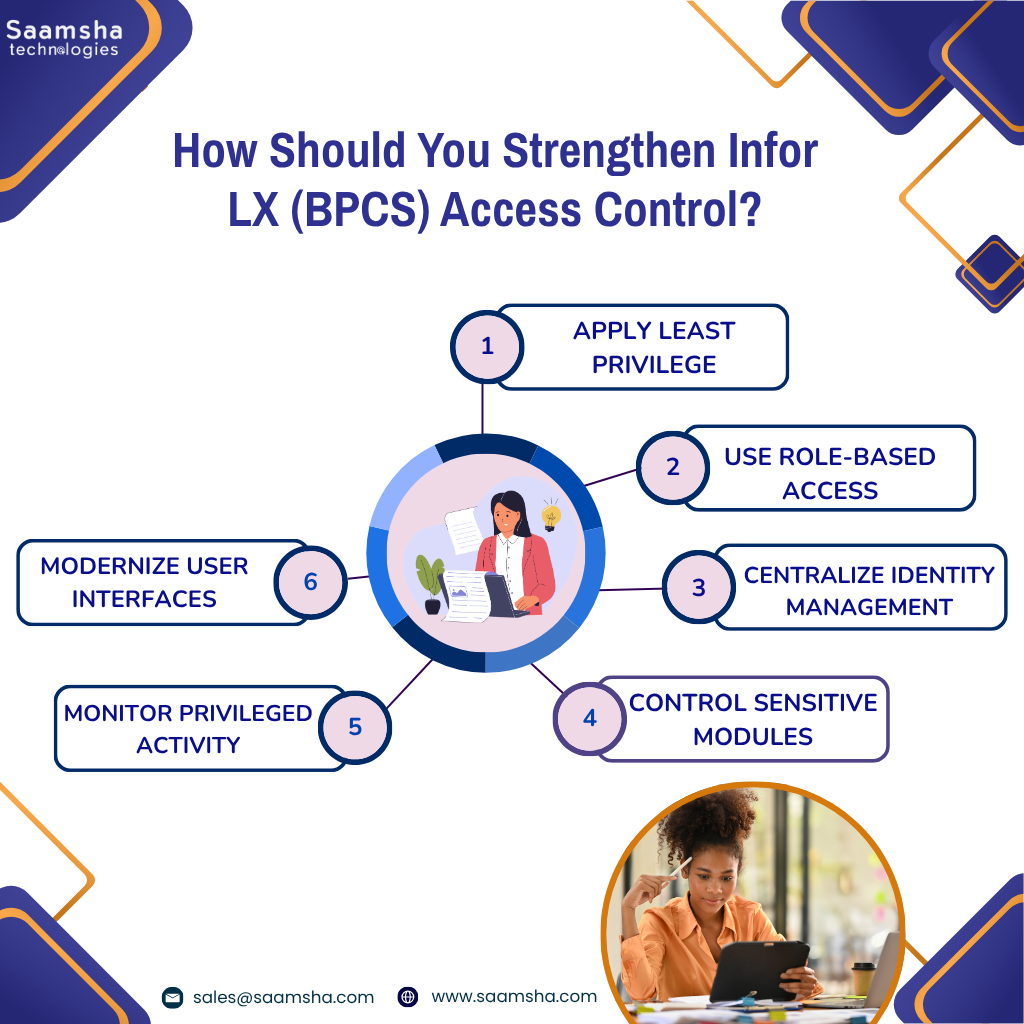
Your organization should strengthen Infor LX access control by combining native IBM i security with centralized identity management and role-based permissions. This approach can help you to reduce excessive privileges and also improve visibility and accountability.
- Apply Least Privilege: You should give users only the LX and IBM i access required for their roles and you need to regularly remove unnecessary administrative and bypass privileges.
- Use Role-Based Access: What is role based access in Infor LX? You can use SYS600 Security Maintenance to assign users the right roles, security units, and access areas instead of giving permissions one by one.
- Centralize Identity Management: You can connect LX with Infor OS Federation Services where supported. This can make user creation, access changes, and account removal easier to manage.
- Control Sensitive Modules: You should limit CEA applications and financial functions to users who actually need them. This helps to prevent unnecessary access to sensitive areas.
- Monitor Privileged Activity: You need to check file access, exit points, and privileged accounts regularly. This helps you find unauthorized changes and keep better track of user activity.
- Modernize User Interfaces: You may use IDF and task-based interfaces where suitable. This can reduce the need for users to directly access sensitive data.
What Should You Include in an Infor LX (BPCS) Security Audit?
Your Infor LX security audit needs to cover user accounts, application permissions, sensitive data, IBM i security, and system activity. Thus, you can identify unnecessary access, security gaps, and potential compliance risks.
- You can check active, inactive, terminated, transferred, and orphaned LX and IBM i profiles. Disable accounts that no longer need access.
- Your organization needs to review administrative accounts and IBM i special authorities such as *ALLOBJ and *SECADM. Limit elevated access to essential users.
- You may review user roles, function keys, action codes, security units, and permissions in SYS600. Use ZXUP audit fields to identify who changed security records and when.
- Businesses should verify that users can access only the modules, facilities, warehouses, companies, and transactions required for their roles.
- You can audit who can create or modify sensitive customer, vendor, item cost, bill of materials, and financial records.
- Your organization may check Infor OS, IFS, IDF, CAS, WebTop, and Electronic Commerce Manager access, provisioning, and data exchanges.
- You can assess password controls, MFA, object permissions, exit points, failed logins, and AUDJRN security events.
Protect your BPCS environment with the right access controls, audits, and IBM i security measures. Saamsha Technologies is trusted by enterprises nationwide because we deliver top-tier AS/400 expertise across the United States.
What Security Hardening Measures Should You Prioritize in ERP LX Software?
Security hardening in Infor ERP LX requires protection at both the application and underlying IBM i levels. The following measures can help you to reduce unauthorized access, vulnerabilities, and operational risks.
- Secure Transaction Controls: You can use Infor LX BPCS action codes, function keys, order types, and order classes to help prevent unauthorized changes, deletions, and approvals.
- Harden the IBM i Platform: You need to review system values, object authorities, database access, and network services. Remove unnecessary permissions and services that are not required.
- Strengthen Application Access: You may use role-based access and least-privilege principles so users get only the permissions they need for their work.
- Synchronize LX and IDF Security: Keep the security settings of LX and IDF properly aligned. This helps user profiles and permission changes stay consistent across both systems.
- Protect External Connections: You can secure ODBC, JDBC, SQL, WebTop, Net-Link, APIs, and other access points. Use network segmentation and VPNs where appropriate.
- Enable MFA: You must apply multi-factor authentication to web-based, remote, and cloud-connected LX access, particularly for privileged accounts.
- Maintain Patches and Updates: You can apply relevant IBM i PTFs, Infor LX updates, and security fixes on a defined schedule.
- Strengthen Monitoring: You should enable IBM i and Infor OS auditing to track failed logins, privilege changes, sensitive transactions, and suspicious activity.
At Saamsha Technologies, we provide reliable AS/400 resources to help businesses strengthen Infor LX security, manage access controls, and protect critical ERP environments. Our services are available across California, Texas, and Ohio.
Final Thoughts
To secure your Infor LX (BPCS), you need to protect the entire environment. This includes LX applications, IBM i resources, integrations, user accounts, and sensitive business data.
Regular security audits help you review user privileges, account status, system configurations, and access to critical business information. The findings can guide timely updates to permissions, authentication settings, and monitoring controls.