Microsoft Dynamics NAV users are entering a decisive transition phase in 2026 as businesses move away from legacy ERP systems toward cloud-based alternatives. This shift reflects broader market momentum, with global ERP spending projected to reach $78.4 billion in 2025.
At the same time, Microsoft’s ERP ecosystem is expanding steadily and generated around $5.4 billion in ERP revenue in 2024. On the other hand, the Dynamics market is expected to grow from $11.37 billion in 2025 to $12.71 billion in 2026.
Microsoft Dynamics 365 Business Central is at the center of this evolution, recognized among the top ERP solutions for SMBs in 2025. As Gartner (2024) highlights, 70% of ERP failures result from poor system fit.
It makes the transition to modern, scalable platforms increasingly critical for long-term efficiency and growth.
Core Differences: Dynamics NAV vs Business Central
Microsoft Dynamics 365 Business Central is the cloud-based evolution of Dynamics NAV within the Microsoft Dynamics ecosystem. It introduces modern capabilities such as cloud deployment, AI-assisted workflows, seamless integrations, auto-scaling, and simplified upgrades. As a result, it offers enhanced scalability, accessibility, and operational efficiency compared to traditional NAV environments.
| Category | Microsoft Dynamics NAV | Business Central |
| Deployment | On-premises/hosted | Cloud SaaS; on-prem/private options |
| User Interface | Windows/RoleTailored | Modern web-based and mobile interface with role-based personalization |
| Financial Management | Limited dimensions | Expanded dimensions with AI-assisted financial insights |
| Reporting | Jet/SSRS/3rd-party | Embedded Power BI/Excel |
| Upgrades | Manual/custom-heavy | 2x yearly waves; safe extensions |
| Integrations | Custom connectors | Native Teams/Outlook/Power Suite/Copilot |
| Customization | C/AL code | Modern AL extensions |
| Remote Access | VPN required | Browser/mobile. No VPN |
| AI & Automation | Very limited | Copilot-assisted workflows and automation capabilities |
| Multi-Entity | Heavy customization | Native support |
| Performance/Scalability | Hardware-dependent | Azure auto-scale |
What’s New in Business Central for 2026?
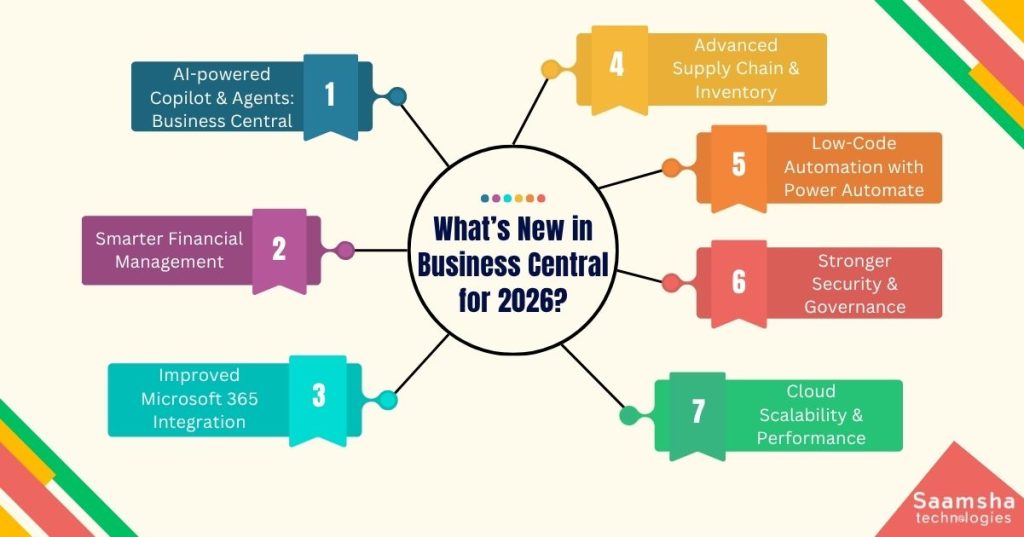
Business Central 2026 introduces a cloud-first, AI-driven ERP architecture built on Microsoft Azure, integrating Copilot, automation, and real-time analytics to deliver scalable, secure, and intelligent business operations.
- AI-powered Copilot & Agents: Business Central introduces advanced AI capabilities that assist with tasks like invoice processing, sales orders, and approvals, reducing manual effort and improving process efficiency.
- Smarter Financial Management: Enhanced reporting, improved compliance features, and deeper Power BI integration enable real-time insights and better forecasting (Microsoft Docs, 2026).
- Improved Microsoft 365 Integration: Seamless connectivity with Outlook, Teams, and Excel allows users to manage workflows directly within familiar tools.
- Advanced Supply Chain & Inventory: Updates include demand forecasting, automated replenishment, and improved warehouse and fulfillment processes.
- Low-Code Automation with Power Automate: Businesses can automate approvals, notifications, and workflows without complex development.
- Stronger Security & Governance: Enhanced role-based access, data policies, and secure AI operations ensure compliance and control.
- Cloud Scalability & Performance: Built on Azure, Business Central offers auto-scaling, improved reliability, and more efficient infrastructure for growing businesses.
These enhancements help businesses streamline operations, improve decision-making speed, and adapt quickly to changing market demands.
What are the Migration Paths and Challenges of Business Central?
Migration follows upgrades for minimal customizations or reimplementation for heavily customized NAV, with challenges in data, customizations, integrations, user adoption, downtime, and security requiring careful planning and training.
- Upgrade (Technical Migration): Suitable for organizations with minimal customizations.
Microsoft’s Cloud Migration tools enable direct data transfer, preserving historical data and reducing implementation time.
- Reimplementation (Functional Migration): Recommended for heavily customized Microsoft Dynamics NAV systems.
This approach rebuilds processes using modern AL extensions, ensuring better scalability, performance, and long-term maintainability.
Key Migration Challenges
- Data Migration Complexity: Legacy data often contains duplicates, inconsistencies, or unsupported formats, requiring thorough data cleansing and validation before migration.
- Customization Conversion: Microsoft Dynamics NAV’s C/AL customizations must be re-engineered into AL extensions. Not all legacy features have direct equivalents, increasing redevelopment effort.
- Integration Gaps: Existing connections with CRM, eCommerce, or third-party tools may require rebuilding using Microsoft Dataverse and Power Platform via APIs.
- User Adoption & Training: Transitioning to a modern UI and workflows can lead to temporary productivity dips without structured training.
- Downtime & Performance Risks: Poor planning can disrupt operations; sandbox testing and phased deployment reduce risks.
- Security & Compliance: Ensuring data protection and regulatory compliance requires properly configured role-based access controls and cloud security controls.
A successful Business Central migration starts with early data and customization audits, followed by sandbox testing and UAT for accuracy.
Minimizing legacy customizations, leveraging native features, and planning integrations through the Power Platform can significantly improve implementation efficiency and long-term scalability.
Business Impact and ROI of Business Central
Business Central drives ROI by unifying automation, analytics, and cloud scalability. It reduces costs, improves accuracy, accelerates decisions, and enables businesses to grow efficiently without increasing operational complexity or infrastructure investments.
Here are the key impacts of upgrading to Business Central for businesses:
- Reduces IT and infrastructure costs with cloud-based deployment
- Eliminates manual processes and minimizes errors and inefficiencies
- Automates finance, sales, and supply chain workflows for higher productivity
- Improves data accuracy and operational consistency across departments
- Enables real-time, data-driven decision-making with AI-powered insights
- Strengthens collaboration through Microsoft 365 and Power BI integration
- Supports scalable growth without proportional cost increases
- Improves financial visibility, faster reporting cycles, and better audit readiness
For example, a multi-location retail chain upgraded to Business Central and integrated Power BI. Real-time dashboards reduced financial reporting time and improved visibility across stores, enabling faster, data-driven decision-making and better cash flow control.
Why Partner with Saamsha for Your Business Central Upgrade?
Saamsha Technologies provides end-to-end support for Microsoft Dynamics 365 and Business Central upgrades. We ensure a seamless transition tailored to your business needs.
Our team manages implementation, customization, and system integration with precision, aligning every step with your existing processes. We follow an agile approach while maintaining a strong focus on security and compliance.
With expertise in enterprise modernization, including legacy system transformation such as IBM i (AS/400) environments, we help businesses transition to modern ERP platforms with minimal disruption.
Our dedicated support services are designed to minimize risks, prevent downtime, and ensure business continuity throughout the upgrade journey. By leveraging modern tools and automation, we streamline workflows and reduce IT complexity.
From initial consultation to ongoing maintenance, we stay with you at every stage. Our goal is to help you achieve greater efficiency, scalability, and sustainable long-term growth.
Takeaway
The shift from Microsoft Dynamics NAV to Business Central represents a strategic move toward a more connected, intelligent, and scalable ERP environment. When evaluating Dynamics NAV vs Business Central, the advantages extend beyond technology to improved agility, real-time insights, and operational efficiency.
As AI, automation, and cloud ecosystems continue to evolve beyond 2026, ERP systems are becoming more integrated and insight-driven. Businesses that embrace this transition early can improve visibility, enhance collaboration, and scale without infrastructure constraints.
Modernizing with Business Central enables organizations to stay competitive, respond faster to market changes, and build a strong foundation for long-term growth.