Switching from Tally to Microsoft Dynamics 365 Business Central is a major step for any business and requires careful planning and clarity.
Business Central is a modern, cloud-based ERP solution used by more than 40,000 companies worldwide and is known to deliver a strong return on investment (up to 106%).
Before making the move, businesses need to understand how Business Central differs from Tally, the advantages it offers, and what to consider during the migration.
5 Key Things You Should Know Before Moving from Tally to Dynamics 365
Let’s understand the 5 most important things one by one before you decide to move
1. Fundamental Differences Between Tally and Microsoft Dynamics 365
Tally has been a reliable accounting tool for Indian businesses for many years. It works well for GST, invoicing, and basic inventory tracking. However, Tally is primarily an accounting software solution, not a complete Enterprise Resource Planning (ERP) system. As a business grows, this becomes a limitation.
Microsoft Dynamics 365 Business Central is a modern cloud-based ERP under the Dynamics 365 suite, designed for small and mid-sized businesses that require unified financial and operational control.
While Tally can handle essential accounting tasks, it does not offer advanced features such as detailed financial reporting, built-in analytics, CRM, or a fully integrated business workflow.
In the table, we have highlighted the technical differences between Tally and Microsoft Dynamics 365:
| Tally | Microsoft Dynamics 365 Business Central |
| Single ledger system (basic financial structure) | Multi-dimensional ledger (more flexible reports and customization) |
| Limited document numbering and control | Automatic document numbers and proper audit tracking |
| Uses its own proprietary database (restricts integrations and scalability) | Uses Microsoft SQL Server and Azure (high security, scalability, faster performance) |
Transform Your Enterprise with World-Class Microsoft Dynamics 365 Solutions – Talk to Saamsha Technologies to start your Business Central journey!
2. Implementation Timeline and Migration Complexity
Many companies worry that moving from Tally to Business Central will take a long time. In reality, the process is faster than most expect.
A complete Business Central implementation usually takes 3 – 6 months, and a fast-track setup can be completed in 6 – 12 weeks. The migration process generally follows these phases:
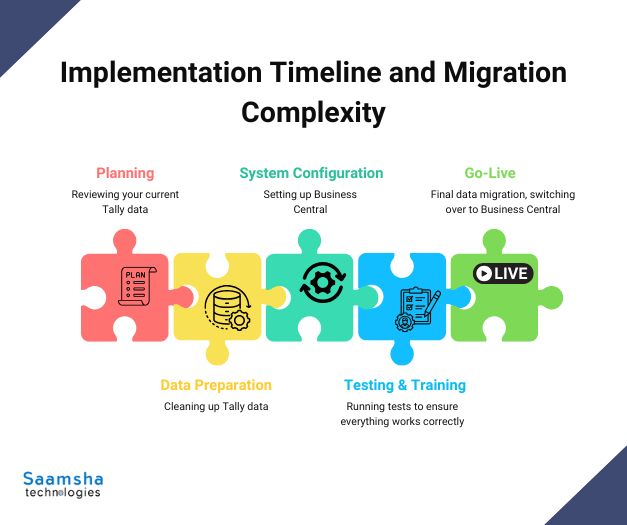
- Planning (2 – 4 weeks): Reviewing your current Tally data, identifying what needs to be moved, and creating a clear action plan.
- Data Preparation (2 – 3 weeks): Cleaning up Tally data, matching fields to Business Central, and checking accuracy.
- System Configuration (2 – 4 weeks): Setting up Business Central, enabling required modules, and customizing workflows as needed.
- Testing & Training (2 – 4 weeks): Running tests to ensure everything works correctly and training your team on the new system.
- UAT Testing (1 – 2 weeks): Conducting User Acceptance Testing to validate readiness and gather final user feedback before launch.
- Go-Live (1 – 2 weeks): Final data migration, switching over to Business Central, and getting support after launch.
3. Cost Considerations and ROI Timeline
Dynamics 365 Business Central offers a free 30-day trial and operates on a subscription model in India. After the latest price update (October 2025), the Essentials plan starts at around ₹6,905 per user per month.
The Premium plan starts at about ₹9,150 per user per month when paid yearly (GST extra). There is also a Team Members license with limited access for ₹665 per user per month.
When it comes to implementation, Indian projects typically cost between ₹20 lakhs and ₹ 80 lakhs. The final amount depends on factors like customization, the size of the project, and the level of support from the implementation partner.
According to Forrester (2024), companies that switched to Business Central achieved:
- 265% ROI over three years
- Payback in under six months
- 12.5% productivity boost in operations
- 15.6% efficiency improvement for finance teams
Savings also come from:
- Eliminating servers and hardware costs
- Lower IT maintenance
- Avoiding third-party system support (up to $80,000 saved per year)
Modernize Your Business Operations with Intelligent MFST Dynamics 365 – Schedule a Free Consultation.
4. Integration Capabilities and Microsoft Ecosystem Advantages
Switching to Microsoft Dynamics 365 Business Central gives businesses access to a connected cloud system, something Tally does not offer.
Business Central works smoothly with Microsoft 365, so users can manage emails, documents, and approvals directly from familiar tools like Outlook and Excel.
Business Central offers a modern, intuitive interface and native mobile app support for remote or distributed teams, which is a major step up from Tally’s typical desktop-restricted environment.
With Power BI, companies can view real-time dashboards and detailed reports, making it easier to understand data and make faster decisions.
Business Central also integrates with Microsoft Teams, allowing employees to receive updates, alerts, and approval requests directly in chat.
Using the Power Platform, businesses can automate repetitive tasks and create simple apps without writing code. Built on Microsoft Azure, Business Central ensures enterprise-grade security, uptime, and scalability for growing organizations.
By adopting Business Central, companies prepare themselves for future growth, automation, and AI-powered innovation.
Still using legacy systems like Tally? Discover how Microsoft Dynamics 365 Business Central modernizes your operations end-to-end.
5. Security, Compliance, and Cloud Infrastructure Advantages
Data protection and regulatory compliance are now essential for every business. This is one of the most significant advantages of Microsoft Dynamics 365 Business Central over Tally.
While Tally is primarily on-premises and requires companies to manage their own security, backups, and disaster recovery, Business Central runs on Microsoft Azure and provides built-in, enterprise-level security.
Business Central has advanced analytics, built-in artificial intelligence (such as Microsoft Copilot), and robust reporting.
Business Central includes features such as multi-factor authentication to prevent unauthorized access, role-based permissions so employees only see the data they need, and data encryption both during transfer and when stored.
Security updates are applied automatically, reducing risk, and audit trails track every change in the system for compliance and transparency. It also meets global standards like ISO 27001, SOC 2, and GDPR.
Business Central also supports India-specific requirements such as GST, e-invoicing, and audit-trail rules, offering greater compliance and superior data protection than Tally.
As a certified Microsoft partner, Saamsha Technologies specializes in seamless Tally-to-Dynamics 365 Business Central migrations with minimal downtime and tailored configurations for Indian businesses.”
Final Words
Migrating from Tally to Microsoft Dynamics 365 Business Central is a strategic step toward long-term business growth.
Business Central offers full ERP capabilities, cloud access from anywhere, strong data security, and seamless integration with tools like Microsoft 365, Teams, and Power BI features that Tally cannot match.
Moving to Business Central prepares organizations for automation, advanced analytics, and smarter decision-making, positioning them for sustained growth and a competitive edge.
Schedule a free Dynamics 365 migration readiness assessment today!